
URL Full Form: Meaning, Definition, Types, Structure, and Examples
URL Full Form – Everything Students Should Know
If you use the internet every day, you have probably seen website addresses like https://www.google.com or https://www.youtube.com. These addresses are known as URLs. Understanding the URL full form and how URLs work is important for students because they are used in websites, online learning platforms, and digital communication.
In this article, we will discuss the URL full form, meaning, structure, types, examples, importance, and frequently asked questions in simple language.
URL Full Form
The URL full form is:
Uniform Resource Locator
A URL is the address of a resource available on the internet. It tells a web browser where a webpage, image, video, or file is located and how to access it.
Example of a URL
https://www.wikipedia.org
Here, the browser uses this address to open the Wikipedia website.
What is URL?
A URL (Uniform Resource Locator) is a unique web address that helps users locate a webpage or any online resource. It acts like the address of a house, but instead of finding a physical location, it helps your browser find information on the internet.
Whenever you type a website address into your browser, you are using a URL.
Definition of URL
A URL is a web address used to identify and locate a specific resource on the internet. It provides the information needed by browsers to retrieve and display web pages or files.
History of URL
The concept of URLs was introduced by Tim Berners-Lee, the inventor of the World Wide Web, in 1994. URLs became the standard method for identifying resources available on the internet.
Today, billions of websites use URLs to allow users to access online content.
Structure of a URL
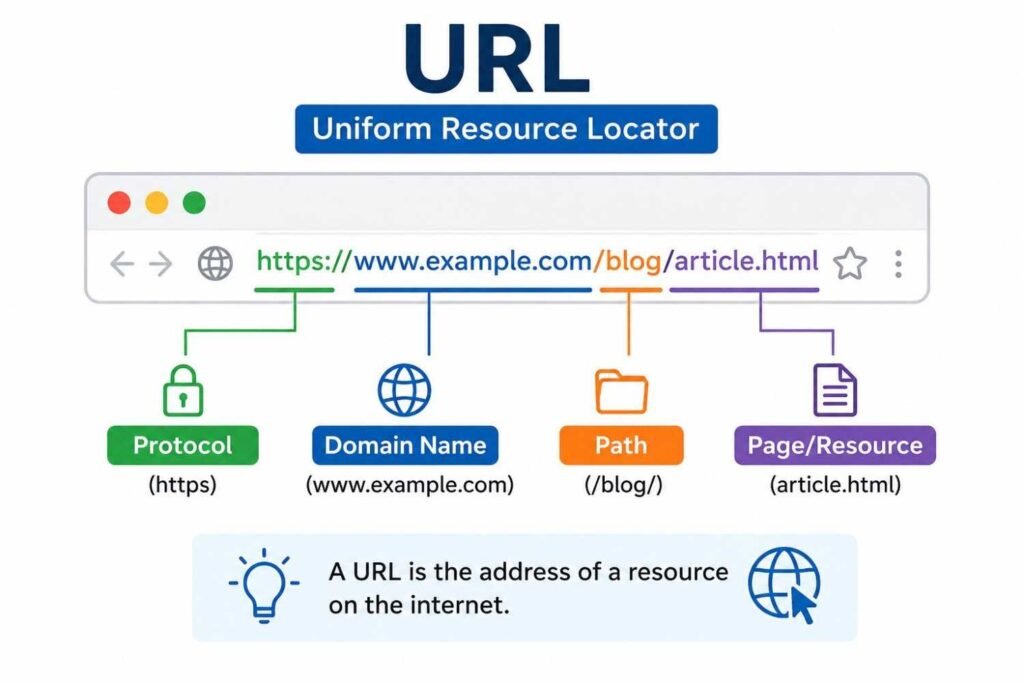
A URL consists of several parts. Consider the following example:
https://www.example.com/blog/article.html
| URL Component | Meaning |
|---|---|
| https | Protocol |
| www.example.com | Domain name |
| /blog | Directory |
| article.html | Specific webpage or file |
Breakdown
1. Protocol
The protocol specifies how data is transferred between the browser and server.
Examples:
HTTP
HTTPS
FTP
2. Domain Name
The domain name identifies the website.
Example:
google.com
3. Path
The path points to a specific page or file inside the website.
Example:
/about-us
Components of a URL
A complete URL may contain:
Protocol
Examples:
HTTP
HTTPS
Domain Name
Examples:
amazon.com
wikipedia.org
Port Number
Defines the communication endpoint.
Example:
:443
Path
Indicates the exact page or file location.
Example:
/contact
Query Parameters
Used to pass additional information.
Example:
?search=laptop
Fragment
Refers to a particular section of a webpage.
Example:
#section1
Types of URLs
There are mainly two types of URLs.
1. Absolute URL
An absolute URL contains the complete web address.
Example:
https://www.example.com/images/photo.jpg
Features
Complete address
Can be accessed from anywhere
Used in external links
2. Relative URL
A relative URL specifies the location relative to the current webpage.
Example:
images/photo.jpg
Features
Shorter format
Used within the same website
Easier for developers to manage
Examples of URLs
Here are some common examples:
| Website | URL |
|---|---|
| https://www.google.com | |
| YouTube | https://www.youtube.com |
| Wikipedia | https://www.wikipedia.org |
| Amazon | https://www.amazon.com |
| https://www.facebook.com |
Why are URLs Important?
URLs are essential because they:
Help users locate websites.
Allow browsers to retrieve web pages.
Make online navigation easier.
Enable sharing of web pages.
Improve search engine optimization (SEO).
Organize information on the internet.
URL vs URI
Many students confuse URL and URI. Although related, they are different.
| Feature | URL | URI |
|---|---|---|
| Full Form | Uniform Resource Locator | Uniform Resource Identifier |
| Purpose | Specifies location | Identifies a resource |
| Includes Location | Yes | Not always |
| Example | https://google.com | urn:isbn:9780141036144 |
Every URL is a URI, but not every URI is a URL.
URL vs Domain Name
| Feature | URL | Domain Name |
|---|---|---|
| Definition | Complete address of a webpage | Name of the website |
| Contains Protocol | Yes | No |
| Contains Path | Yes | No |
| Example | https://www.amazon.com/books | amazon.com |
Common URL Protocols
HTTP
HyperText Transfer Protocol
Used for transferring web pages over the internet.
Example:
http://example.com
HTTPS
HyperText Transfer Protocol Secure
Provides encrypted and secure communication.
Example:
https://example.com
FTP
File Transfer Protocol
Used for transferring files between computers.
Example:
ftp://example.com
Advantages of URLs
Some major advantages are:
Easy access to websites.
Quick sharing of information.
Organized structure for web resources.
Better navigation.
Helps search engines index pages.
Supports online communication and learning.
Disadvantages of URLs
Despite their usefulness, URLs have some limitations:
Long URLs can be difficult to remember.
Broken links may occur.
Malicious URLs can lead to phishing websites.
Typing errors may result in incorrect pages.
Applications of URL
URLs are used in:
Websites
Online shopping platforms
Search engines
Social media platforms
Educational websites
Cloud storage services
Video streaming websites
Interesting Facts About URLs
URL stands for Uniform Resource Locator.
URLs were introduced by Tim Berners-Lee.
Every webpage has a unique URL.
HTTPS URLs are more secure than HTTP URLs.
Search engines use URLs for indexing webpages.
URLs can contain letters, numbers, and symbols.
URL Full Form in Computer
In computer science, the URL full form in computer is:
Uniform Resource Locator
It is the address used to access information stored on servers connected to the internet.
URL Full Form in Networking
In networking, URL refers to a web address that identifies the location of a resource and the protocol used to access it.
Simple Example of URL
Suppose you want to watch a video on YouTube. You enter:
https://www.youtube.com
The browser reads the URL and takes you directly to YouTube’s servers, where the webpage is loaded and displayed.
Frequently Asked Questions (FAQs)
What is the URL full form?
The URL full form is Uniform Resource Locator.
What is a URL?
A URL is the address used to locate a webpage or resource on the internet.
Who invented URLs?
Tim Berners-Lee introduced URLs as part of the World Wide Web.
What are the main parts of a URL?
The main parts are:
Protocol
Domain name
Path
Query parameters
Fragment
What is the difference between URL and URI?
A URL specifies the location of a resource, while a URI identifies a resource.
What is an example of a URL?
An example is:
https://www.google.com
Which protocol is more secure, HTTP or HTTPS?
HTTPS is more secure because it encrypts communication between the browser and the server.
Conclusion
The URL full form is Uniform Resource Locator. It is the address that helps users access webpages and online resources. Every website, image, video, or document available on the internet has its own URL. Understanding URLs is essential for students because they are a fundamental part of web browsing, networking, and digital communication. Learning how URLs work will also help you understand websites, search engines, and internet technology more effectively.