Computer Full Form: Meaning, History, Components, Types, and Uses
What is the Computer Full Form?
The term computer is one of the most commonly used words in the modern world. Many students search for the computer full form while studying basic computer science and general knowledge.
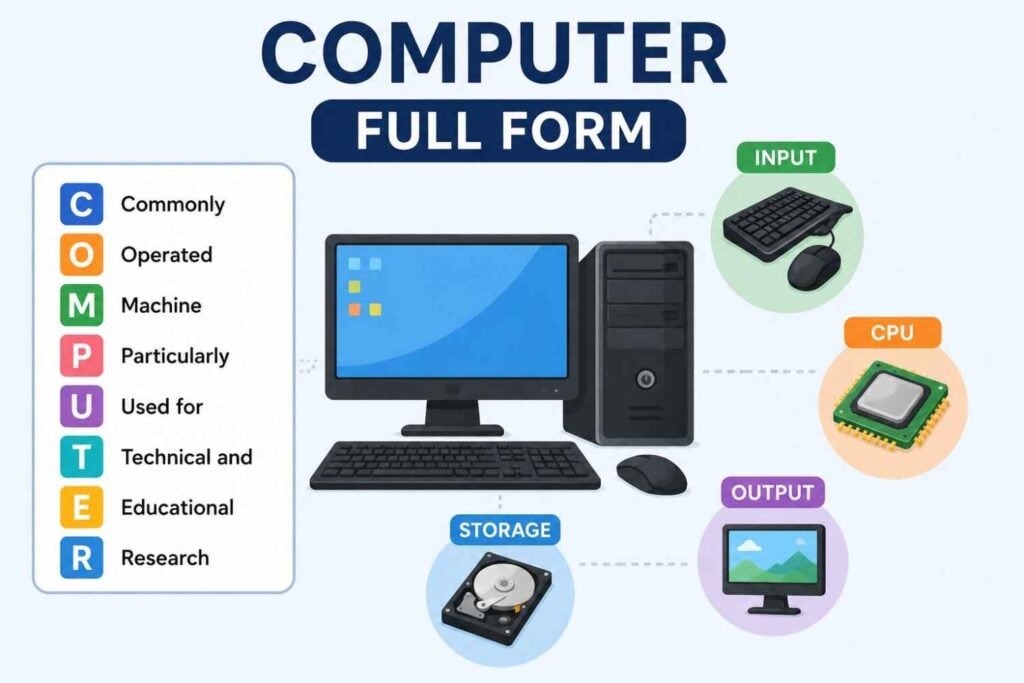
Although Computer is not officially an acronym, a popular and widely accepted educational expansion is:
C – Commonly
O – Operated
M – Machine
P – Particularly
U – Used for
T – Technical and
E – Educational
R – Research
So, the computer full form is often written as:
Commonly Operated Machine Particularly Used for Technical and Educational Research.
It is important to note that this is a backronym created for educational purposes and not the official origin of the word “computer.”
Introduction to Computer
A computer is an electronic device that accepts data, processes it, stores it, and produces meaningful information.
Today, computers are used almost everywhere, including:
Schools
Colleges
Offices
Hospitals
Banks
Industries
Homes
Government organizations
From online classes to artificial intelligence, computers have become an essential part of our daily lives.
What is a Computer?
A computer is a programmable electronic machine that performs calculations and processes information according to a set of instructions.
Simple Definition
A computer is a device that:
Receives data (Input)
Processes data
Stores information
Produces results (Output)
For example:
When you type a question into a search engine, the computer processes your request and displays relevant results within seconds.
History of Computers
The evolution of computers has been remarkable.
Early Computing Devices
The earliest calculating device was the Abacus, which was used thousands of years ago.


Important Milestones
Abacus
Used for basic arithmetic calculations.
Pascaline
Invented by Blaise Pascal in 1642.
Analytical Engine
Designed by Charles Babbage, often called the “Father of the Computer.”
ENIAC
One of the first general-purpose electronic computers.
Modern Computers
Today’s computers are faster, smaller, and more powerful than ever before.
Characteristics of a Computer
Computers possess several unique features.
Speed
A computer can perform millions or even billions of calculations in seconds.
Accuracy
Computers provide highly accurate results when given correct instructions.
Storage Capacity
Large amounts of data can be stored and retrieved easily.
Automation
Computers can perform tasks automatically once programmed.
Reliability
They can work continuously without getting tired.
Versatility
Computers are used in education, business, healthcare, entertainment, and many other fields.
Basic Components of a Computer
A computer consists of several important components.
Input Unit
The input unit allows users to enter data into the computer.
Examples
Keyboard
Mouse
Scanner
Microphone
Central Processing Unit (CPU)
The CPU is known as the brain of the computer.
It performs calculations and controls all computer operations.
Main Parts of CPU
Arithmetic Logic Unit (ALU)
Performs calculations and logical operations.
Control Unit (CU)
Manages and coordinates computer activities.
Memory Unit
Stores instructions and data temporarily.
Output Unit
The output unit displays processed information.
Examples
Monitor
Printer
Speakers
Projector
Storage Devices
Storage devices keep data permanently.
Examples
Hard Disk Drive (HDD)
Solid State Drive (SSD)
USB Drive
Memory Card
How Does a Computer Work?
A computer follows a simple cycle.
Step 1: Input
The user enters data.
Step 2: Processing
The CPU processes the data.
Step 3: Storage
The information is stored if required.
Step 4: Output
The final result is displayed.
This process is called the Input-Process-Output (IPO) Cycle.
Types of Computers
Computers come in different forms depending on their size and capabilities.
Supercomputers
The fastest and most powerful computers.
Uses
Weather forecasting
Scientific research
Space exploration
Mainframe Computers
Used by large organizations.
Applications
Banking
Government databases
Airline reservations
Minicomputers
Medium-sized computers used by businesses.
Microcomputers
Personal computers used by individuals.
Examples
Desktop computers
Laptops
Tablets
Generations of Computers
The development of computers is divided into five generations.
First Generation (1940–1956)
Vacuum tubes
Large size
High electricity consumption
Second Generation (1956–1963)
Transistors
Faster processing
Reduced size
Third Generation (1964–1971)
Integrated Circuits (ICs)
Improved reliability
Fourth Generation (1971–Present)
Microprocessors
Personal computers
Fifth Generation (Present and Future)
Artificial Intelligence (AI)
Machine Learning
Robotics
Uses of Computers
Computers are used in almost every field.
Education
Students use computers for:
Online classes
Research
Assignments
Digital learning
Healthcare
Hospitals use computers for:
Patient records
Medical imaging
Diagnostics
Banking
Banks rely on computers for:
Online transactions
ATM services
Account management
Business
Businesses use computers for:
Accounting
Inventory management
Communication
Entertainment
Computers provide:
Gaming
Video streaming
Music
Social media access
Advantages of Computers
Fast Processing
Computers complete tasks quickly.
Improved Productivity
They help users work more efficiently.
Better Communication
Computers enable instant communication worldwide.
Data Storage
Large amounts of information can be stored securely.
Access to Knowledge
The internet provides unlimited learning opportunities.
Disadvantages of Computers
Despite their benefits, computers also have some drawbacks.
Health Issues
Excessive usage may cause:
Eye strain
Neck pain
Poor posture
Cyber Security Risks
Hackers and viruses can threaten computer systems.
Job Displacement
Automation can replace certain manual jobs.
Dependence on Technology
People increasingly rely on computers for daily tasks.
Computer Hardware and Software
Students often confuse hardware and software.
| Hardware | Software |
|---|---|
| Physical components | Programs and applications |
| Can be touched | Cannot be touched |
| Keyboard, Monitor, CPU | Windows, MS Office, Chrome |
Both hardware and software are necessary for a computer to function.
Importance of Computers for Students
For Class 12 students, computer knowledge is extremely important.
Benefits
Supports academic learning
Improves digital literacy
Enhances research skills
Develops technical knowledge
Opens career opportunities
In today’s competitive world, basic computer skills are essential regardless of career choice.
Career Opportunities in Computer Science
Students interested in technology can pursue exciting careers.
Software Developer
Creates software applications.
Data Scientist
Analyzes and interprets data.
Cyber Security Expert
Protects digital systems from threats.
Web Developer
Builds websites and web applications.
Artificial Intelligence Engineer
Develops AI-based technologies.
Network Administrator
Manages computer networks.
Future of Computers
The future of computers is closely connected with emerging technologies.
Artificial Intelligence
AI-powered computers are becoming more intelligent.
Quantum Computing
A revolutionary technology capable of solving complex problems much faster.
Cloud Computing
Allows users to access data and applications online.
Robotics
Combines computers with machines to automate tasks.
The future promises even greater innovations driven by computer technology.
Computer Full Form in Hindi
The computer full form in Hindi is commonly expressed as:
सामान्य रूप से संचालित मशीन जो तकनीकी और शैक्षिक अनुसंधान के लिए उपयोग की जाती है।
However, students should remember that “computer” itself is not officially an acronym.
Frequently Asked Questions (FAQs)
1. What is the computer full form?
The commonly used computer full form is:
Commonly Operated Machine Particularly Used for Technical and Educational Research.
2. Is computer an official acronym?
No. The word “computer” is not officially an acronym. The expansion is used mainly for educational purposes.
3. Who is known as the Father of the Computer?
Charles Babbage is known as the Father of the Computer.
4. What are the main components of a computer?
The main components are:
Input Unit
CPU
Output Unit
Storage Devices
5. Why are computers important?
Computers help in education, communication, business, healthcare, entertainment, and research.
6. What is the brain of a computer?
The CPU (Central Processing Unit) is called the brain of the computer.
7. What are the types of computers?
Major types include:
Supercomputers
Mainframe Computers
Minicomputers
Microcomputers
8. What is the computer full form in Hindi?
It is commonly written as:
सामान्य रूप से संचालित मशीन जो तकनीकी और शैक्षिक अनुसंधान के लिए उपयोग की जाती है।
Conclusion
The computer full form is commonly explained as Commonly Operated Machine Particularly Used for Technical and Educational Research, although it is not an official acronym. A computer is an electronic device that processes data, stores information, and produces meaningful results.
From education and healthcare to banking and artificial intelligence, computers have transformed nearly every aspect of modern life. For Class 12 students, understanding the basics of computers is essential because digital skills are becoming increasingly important in higher education and professional careers.
As technology continues to evolve, computers will remain at the center of innovation, creating endless opportunities for learning, growth, and career development. Understanding the computer full form, history, components, and applications provides a strong foundation for future success in the digital world.