
UPS Full Form: Meaning, Types, Working, Benefits, and Uses
What is the UPS Full Form?
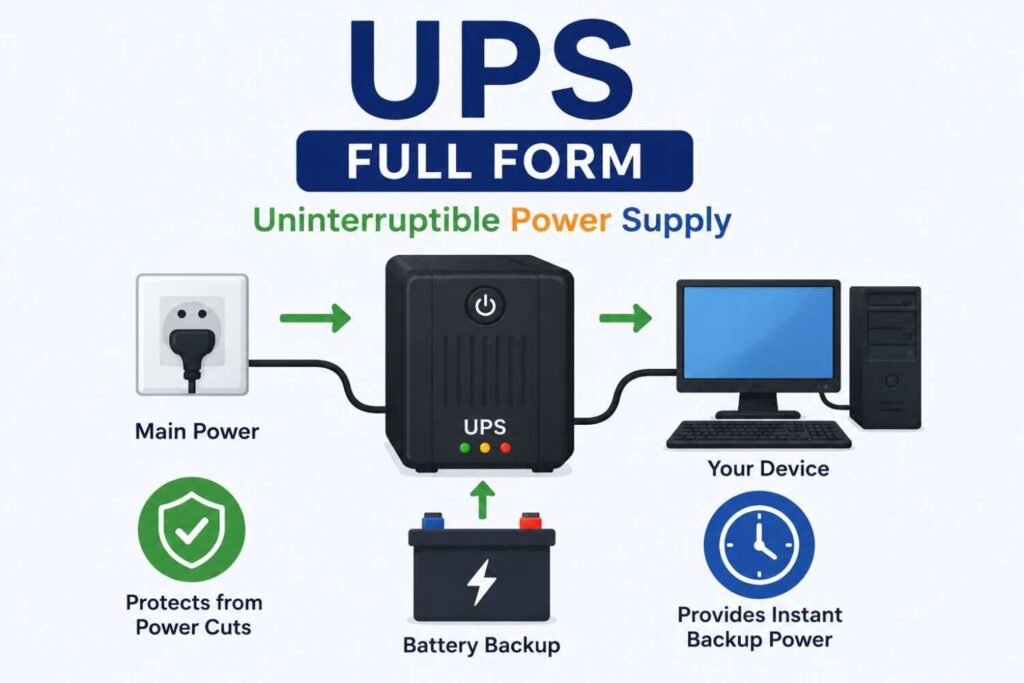
The UPS full form is Uninterruptible Power Supply. It is an electronic device that provides emergency power to electrical equipment when the main electricity supply fails.
A UPS is commonly used with computers, servers, networking devices, medical equipment, and other electronic systems that require continuous power. It acts as a backup power source and helps prevent data loss, hardware damage, and work interruptions during power outages.
For students, understanding the UPS full form is important because UPS systems are widely used in schools, colleges, offices, and homes to protect electronic devices.
Introduction to UPS
Imagine you are working on an important school project on your computer and suddenly the electricity goes off. Without a UPS, your computer would shut down immediately, and you might lose unsaved work.
A UPS (Uninterruptible Power Supply) solves this problem by instantly supplying backup power when the main power source fails.
Unlike generators, which take time to start, a UPS provides power instantly without any interruption.
UPS Full Form and Meaning
UPS = Uninterruptible Power Supply
Let’s understand the meaning of each word:
Uninterruptible
The power supply continues without interruption.
Power
Provides electrical energy to connected devices.
Supply
Supplies backup electricity during outages.
In simple terms, a UPS ensures that electronic devices continue to operate even when there is a power failure.
What is a UPS?
A UPS is an electrical device that contains batteries and electronic circuits designed to provide temporary backup power.
Its primary functions are:
Supplying backup power
Protecting devices from voltage fluctuations
Preventing data loss
Safeguarding sensitive equipment
Most UPS systems can provide power for a few minutes to several hours depending on their capacity.
Why is UPS Important?
A UPS plays a vital role in protecting electronic equipment.
Prevents Data Loss
Users get enough time to save their work during power outages.
Protects Hardware
A UPS shields devices from sudden power surges and voltage fluctuations.
Ensures Continuous Operation
Critical systems continue functioning even during power failures.
Reduces Downtime
Businesses can avoid interruptions and productivity losses.
Supports Safe Shutdown
Allows proper shutdown of computers and servers.
How Does a UPS Work?
A UPS continuously monitors the incoming electricity supply.
Normal Operation
When electricity is available:
The UPS powers connected devices.
Its battery remains charged.
During Power Failure
When electricity goes off:
The UPS instantly switches to battery power.
Connected devices continue running.
Users can save their work or safely shut down equipment.
When Power Returns
The UPS automatically switches back to mains power.
The battery starts recharging.
Main Components of a UPS
A UPS consists of several important parts.
Battery
Stores electrical energy for backup power.
Rectifier
Converts AC power into DC power for charging batteries.
Inverter
Converts battery DC power back into AC power.
Charger
Keeps the battery fully charged.
Control Circuit
Manages switching between mains power and battery power.
Types of UPS
There are three major types of UPS systems.
Offline UPS
Also known as Standby UPS.
Features
Affordable
Suitable for home use
Provides basic backup protection
Common Uses
Personal computers
Home offices
Small devices
Line-Interactive UPS
Offers better protection against voltage fluctuations.
Features
Automatic voltage regulation
Improved battery life
Better power management
Common Uses
Small businesses
Workstations
Networking equipment
Online UPS
Provides the highest level of protection.
Features
Continuous power supply
No switching delay
Superior voltage regulation
Common Uses
Data centers
Hospitals
Banks
Industrial applications
Difference Between UPS and Inverter
Many people confuse a UPS with an inverter.
| Feature | UPS | Inverter |
|---|---|---|
| Full Form | Uninterruptible Power Supply | Inverter |
| Power Switching Time | Instant | Small Delay |
| Primary Use | Electronic Equipment | Household Appliances |
| Data Protection | Excellent | Limited |
| Cost | Higher | Lower |
UPS systems are specifically designed to protect sensitive electronic devices.
Applications of UPS
UPS systems are used in many areas.
Computers
Protects computers from sudden shutdowns.
Schools and Colleges
Supports digital classrooms and computer labs.
Hospitals
Ensures uninterrupted operation of medical equipment.
Banks
Maintains critical banking operations.
Data Centers
Protects servers and networking devices.
Industries
Supports automated manufacturing systems.
Advantages of UPS
Instant Backup Power
No interruption during power failures.
Voltage Protection
Protects against voltage spikes and fluctuations.
Data Security
Prevents data corruption and loss.
Equipment Protection
Extends the lifespan of electronic devices.
Improved Productivity
Reduces downtime during power outages.
Disadvantages of UPS
Although UPS systems are beneficial, they have some limitations.
Limited Backup Time
Most UPS batteries provide backup for a short period.
Battery Maintenance
Batteries require periodic replacement.
Higher Cost
Advanced UPS systems can be expensive.
Weight
Large UPS units can be heavy.
UPS Capacity and Ratings
UPS systems are rated in:
VA (Volt-Ampere)
Measures apparent power.
kVA (Kilovolt-Ampere)
Used for larger UPS systems.
Common ratings include:
600 VA
1000 VA
1500 VA
5 kVA
10 kVA and above
Choosing the right capacity depends on the connected load.
How to Choose the Right UPS
Before purchasing a UPS, consider:
Power Requirement
Calculate the total power consumption of devices.
Backup Time
Determine how long backup power is needed.
Number of Devices
Consider all equipment connected to the UPS.
Budget
Select a UPS within your budget range.
Future Expansion
Choose a slightly larger capacity for future needs.
Maintenance Tips for UPS
Proper maintenance increases UPS lifespan.
Keep Batteries Charged
Avoid complete battery discharge.
Clean Regularly
Prevent dust accumulation.
Check Connections
Inspect cables and connections periodically.
Replace Batteries on Time
Old batteries reduce performance.
Avoid Overloading
Never exceed the UPS capacity.
Role of UPS in Education
UPS systems are extremely important in educational institutions.
Benefits
Supports online learning
Protects computer labs
Prevents data loss during exams
Ensures uninterrupted digital education
Many schools and colleges install UPS systems to maintain continuous operations.
UPS in Modern Technology
As technology becomes increasingly dependent on continuous power, UPS systems play a crucial role in:
Cloud computing
Data centers
Artificial intelligence systems
Smart classrooms
Online businesses
The demand for reliable UPS solutions continues to grow worldwide.
Career Opportunities Related to UPS Systems
Students interested in electrical and electronics fields can explore careers such as:
Electrical Engineer
Designs and maintains power systems.
Electronics Technician
Repairs and services UPS equipment.
Power Systems Engineer
Works on backup power solutions.
Maintenance Engineer
Manages electrical infrastructure.
Technical Support Specialist
Provides UPS installation and support services.
UPS Full Form in Hindi
The UPS full form in Hindi is:
अबाधित विद्युत आपूर्ति
or
निर्बाध विद्युत आपूर्ति प्रणाली
It refers to a device that provides uninterrupted power during electricity failures.
Frequently Asked Questions (FAQs)
1. What is the UPS full form?
The UPS full form is Uninterruptible Power Supply.
2. What is the purpose of a UPS?
A UPS provides backup power and protects electronic devices during power outages.
3. Is UPS different from an inverter?
Yes. A UPS provides instant backup power, while an inverter usually has a small switching delay.
4. How long can a UPS provide backup?
Backup time depends on the battery capacity and connected load, typically ranging from a few minutes to several hours.
5. Why is a UPS important for computers?
It prevents sudden shutdowns, data loss, and hardware damage.
6. What are the main types of UPS?
The three main types are Offline UPS, Line-Interactive UPS, and Online UPS.
7. Can a UPS protect against voltage fluctuations?
Yes. Most UPS systems offer voltage regulation and surge protection.
8. What is the UPS full form in Hindi?
It is अबाधित विद्युत आपूर्ति.
Conclusion
The UPS full form is Uninterruptible Power Supply, an essential device that provides immediate backup power during electrical failures. It protects computers, servers, medical equipment, and other sensitive electronic devices from sudden shutdowns, voltage fluctuations, and data loss.
For students, understanding the UPS full form is valuable because UPS systems are widely used in educational institutions, homes, offices, and industries. As technology becomes more dependent on continuous power, the importance of UPS systems continues to increase.
Whether you’re protecting a personal computer or supporting critical business operations, a UPS remains one of the most reliable solutions for ensuring uninterrupted power and equipment safety.